Relying on third-party job boards is expensive and leaves you with little control. WP Job Manager offers recruitment agencies and established firms a cost-effective alternative: a complete, professionally branded recruitment platform that runs entirely on your own WordPress website.
This guide covers everything you need to know — from the core free features to the premium add-ons that matter most, how to integrate the plugin with LinkedIn and major ATS or CRM platforms, and how to get started in phases.
What Is WP Job Manager?
WP Job Manager is a free, lightweight, and highly extendable plugin that allows you to create a job board website using WordPress. Originally developed by Automattic — the company behind WordPress.com, WooCommerce, and Jetpack — it integrates seamlessly with any WordPress site, enabling you to list job openings, accept applications from candidates, and provide job seekers with easy navigation and search features.
Its biggest strength is its modular design. The free core plugin provides all the basics: job listings, categories, and front-end submission forms. From there, you can extend functionality with premium add-ons such as Resume Manager, Applications, and Job Alerts to create a more advanced recruitment platform. This means you pay only for the features you actually need.
For recruitment agencies, this translates into a fully branded recruitment hub that you own and control — without recurring fees to LinkedIn Recruiter, third-party job boards, or expensive ATS software subscriptions.
Core Free Features
Searchable and Filterable Job Listings
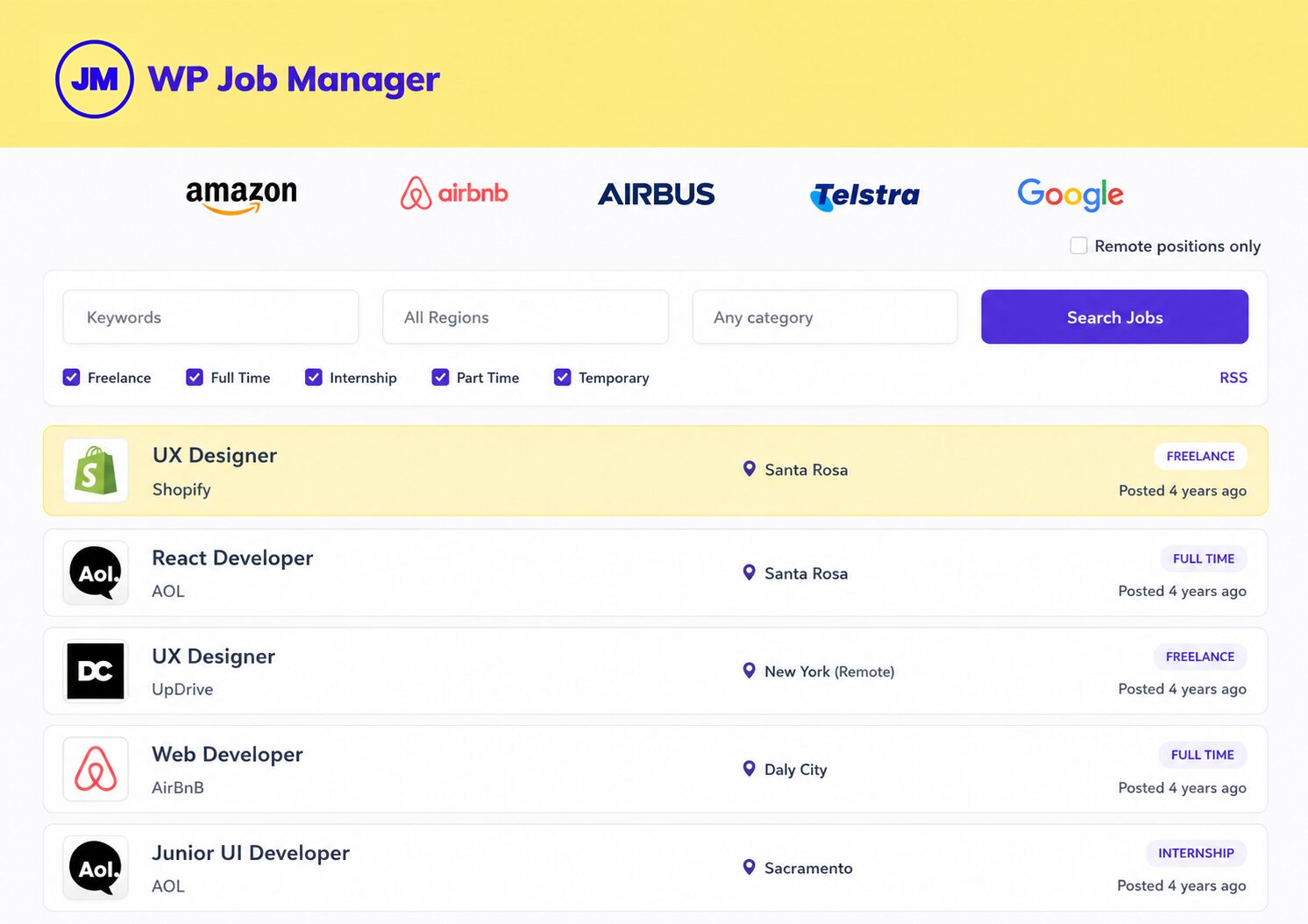
The free core plugin includes AJAX-powered, searchable, and filterable job boards added to your pages via shortcodes. Candidates can search and filter by role, location, category, and job type — all without page reloads, delivering a smooth, modern user experience.
Front-End Job Management
Recruitment agencies can manage their listings from both the back end and the front end of the website. From the front end, you can view, edit, update expiry dates, and mark jobs as filled simply by logging in — without needing to access the WordPress dashboard. This is especially useful when staff are working from a tablet, travelling, or in between client meetings.
Job Statistics
The plugin provides job statistics for each listing, including views and search impressions. This helps you understand which roles are attracting the most candidate interest — useful intelligence when advising clients on how competitive a role looks in the current market.
RSS Feeds for Job Alerts
Every search on your job board displays an RSS link, allowing job seekers to subscribe and receive alerts whenever new roles matching their criteria are posted. This is a passive but effective tool for keeping engaged candidates informed without any manual effort on your part.
SEO-Friendly Listing Pages
Every job gets its own unique listing page, making it fully indexable by search engines. For recruitment agencies specialising in a particular niche — fintech, healthcare, private equity, or any other sector — writing detailed, keyword-rich job descriptions for each listing turns your website into a content asset that ranks for the very search terms your ideal candidates use. Over time, this creates a steady stream of inbound talent at no cost per application.
Premium Add-Ons Most Valuable to Recruitment Agencies
The single site licence is priced at $159 per year and bundles all core paid add-ons together. Individual add-ons can also be purchased separately, starting from $29 per year.
Resume Manager ($49/year)
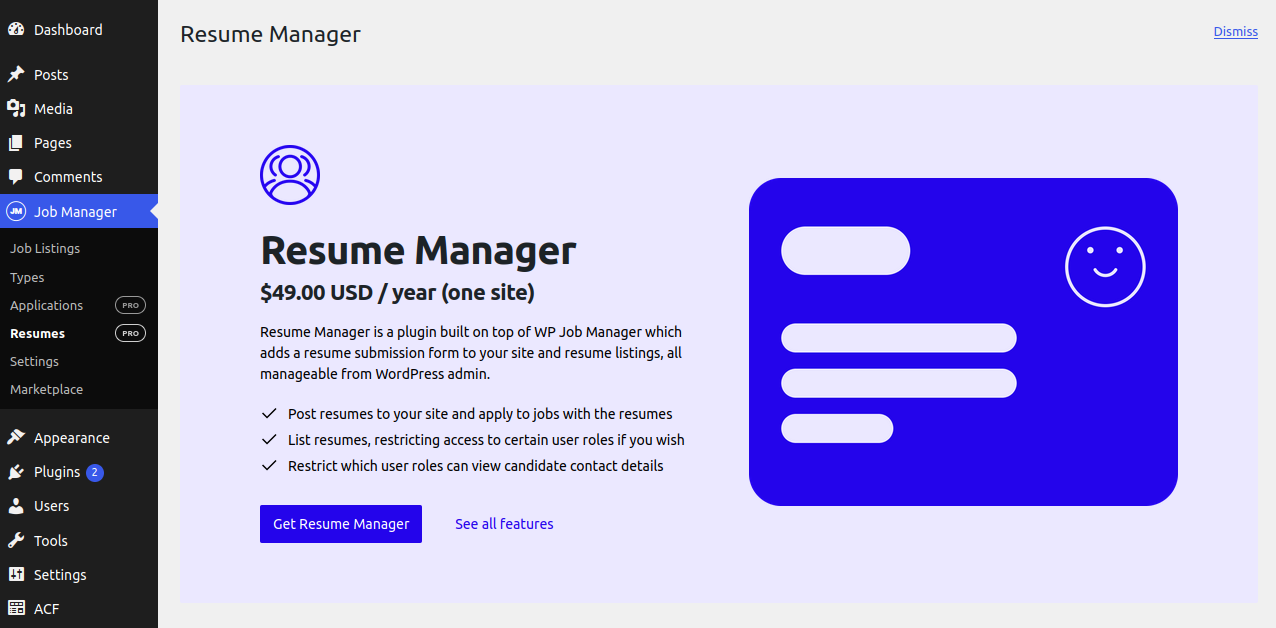
Resume Manager adds a resume submission form to your site and a searchable resume database, all manageable from your WordPress admin. The submission form collects candidates’ names, contact information, websites, education, and employment history. Access to resumes can be restricted using WordPress user capabilities, allowing you to build a private, invite-only talent database.
This is perhaps the most strategically significant add-on for recruitment agencies. Every CV submitted on your site belongs entirely to you — not to LinkedIn, not to a third-party job board. You are building a proprietary talent database that appreciates in value over time and cannot be taken away by a platform policy change or subscription price increase.
Applications Add-On ($49/year)
The Applications add-on replaces the standard mail and website application links on your job listings with a fully customisable application form. Candidates can submit their name, email address, cover letter, and resume file directly through your site.
What makes this particularly powerful is the pipeline management it enables. All applications are stored in the database and visible in your admin dashboard. You can add private notes to each candidate, rate and comment on applications privately, and organise them by status — for example: new, interviewed, offer sent, or archived. This keeps your entire hiring process out of your email inbox and into a structured, centrally managed system.
If you also use Resume Manager, a logged-in candidate’s saved resume is automatically selectable on the application form, and a private link to their online resume is sent along with the application.
Job Alerts ($49/year)
The Job Alerts add-on allows registered candidates to save their job searches and create automated email alerts that notify them when new matching roles are posted — daily, weekly, fortnightly, or monthly. From a recruitment agency’s perspective, this keeps your candidate pool warm and re-engaged automatically, without any manual outreach on your part.
Job Tags ($29/year)
Job Tags improves your listings by allowing you to add granular tags that can include skills, technologies, interests, and specialisations. Listings can then be displayed and searched based on their corresponding tags. For agencies working in a niche industry, this precision tagging is essential for matching candidates to roles accurately and quickly.
Bookmarks
The Bookmarks add-on allows logged-in candidates and employers to bookmark jobs and resumes, along with a private note. Recruitment agencies can use this to shortlist candidates against specific roles directly within the dashboard, keeping workflow organised without needing a separate spreadsheet or external tool.
Filling Your Board via Indeed Integration
A common challenge for a newly launched recruitment agency website is that the job board can feel sparse until enough client mandates are active. The Indeed Integration add-on (from $39) allows you to pull job listings from Indeed and populate your board automatically. This ensures that visiting candidates always see a rich, active board — which maintains credibility and encourages registration and return visits while your own mandate pipeline builds.
Integration with LinkedIn and Major ATS/CRM Platforms
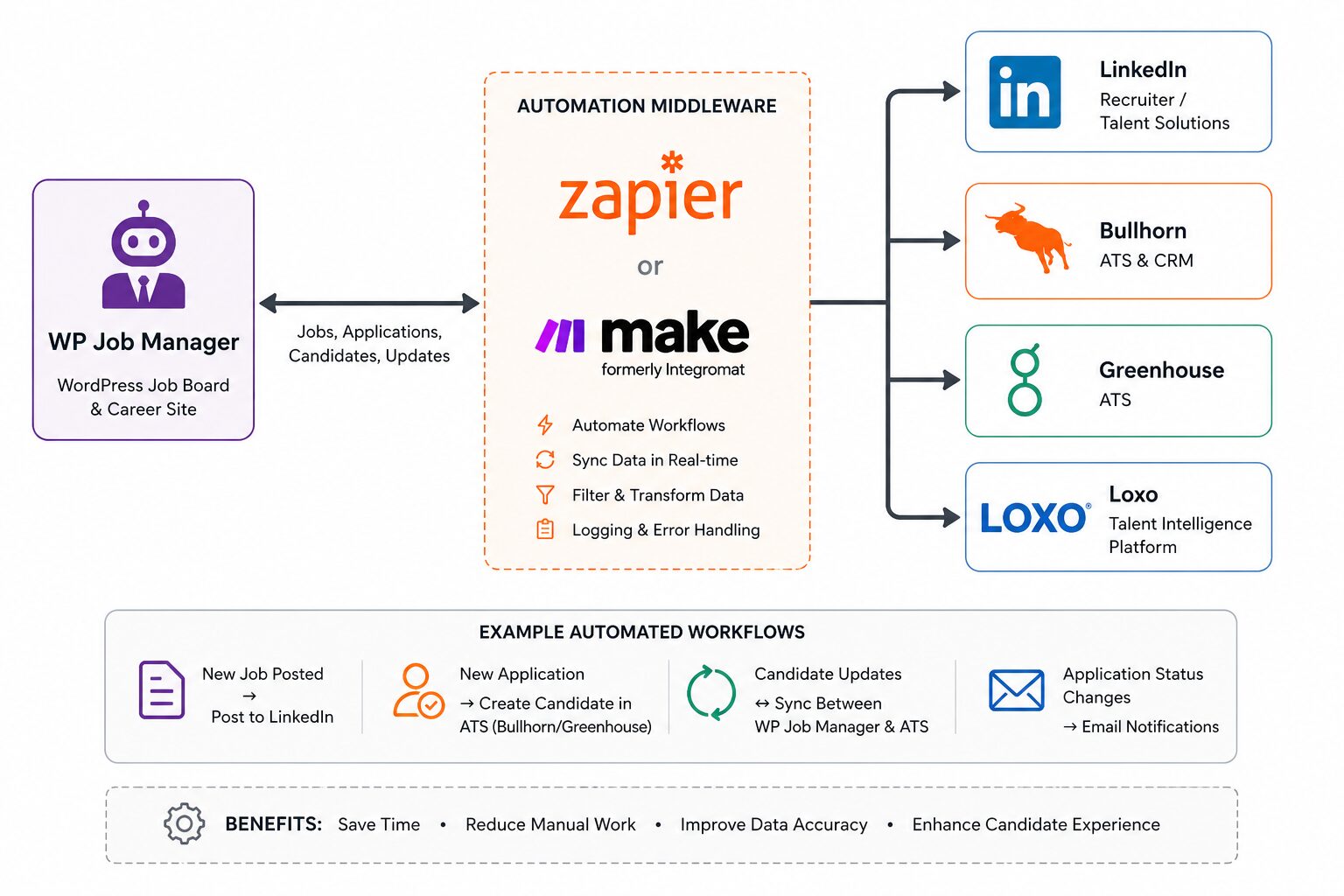
WP Job Manager is a WordPress-based job board plugin, while platforms like Bullhorn, Greenhouse, Workable, Loxo, and Recruit CRM are standalone SaaS recruitment systems. WP Job Manager does not have built-in native integrations with these platforms out of the box. However, integration is possible through third-party plugins, dedicated connectors, and middleware automation tools.
A third-party add-on called LinkedIn for WP Job Manager allows candidates to apply to a job directly using their LinkedIn account, requiring both the free WP Job Manager plugin and the paid Applications add-on. An alternative add-on called ApplyWith supports one-click applications via both LinkedIn and Indeed simultaneously. For outbound job posting to LinkedIn, automation tools such as Zapier and Uncanny Automator can trigger a LinkedIn post whenever a new role is published on your site. Note that LinkedIn’s deepest native integrations — including two-way candidate data sync and Recruiter System Connect — are reserved for enterprise ATS partners; WP Job Manager is not on LinkedIn’s official ATS partner list.
Bullhorn
A dedicated third-party plugin — available from BullhornPlugin.com or via the Matador Jobs product — provides full two-way synchronisation between Bullhorn and WP Job Manager. Jobs added or updated in Bullhorn are reflected on your website automatically, and applications submitted on your site are pushed back into Bullhorn without manual effort. The integration is compatible with WP Job Manager’s native Applications add-on and the Field Editor add-on for custom field mapping. Note that this integration is maintained by a third-party vendor rather than Automattic, so ongoing support depends on that vendor.
Greenhouse, Recruit CRM, Workable, and Loxo
For Greenhouse, a basic display plugin exists for WordPress, and Zapier can automate two-way job and application data flows, though Greenhouse requires a paid Zapier plan and the integration is capped at 100 jobs. For Recruit CRM and Workable, Zapier provides partial automation at the general WordPress level, though neither has a native WP Job Manager connector. Loxo currently has no off-the-shelf integration solution and would require custom development work.
Automation Middleware: The Practical Bridge
For any platform without a dedicated plugin, middleware tools such as Bit Integrations and Uncanny Automator connect WP Job Manager with over 200 external platforms — including Zoho Recruit, HubSpot, Airtable, and Google Sheets — through no-code workflows triggered by job postings and applications.
Integration Options at a Glance
| Platform | Integration Route | Depth |
|---|---|---|
| LinkedIn (Apply) | Third-party add-on (LinkedIn for WPJM / ApplyWith) | Good |
| LinkedIn (Posting) | Zapier / Uncanny Automator | Partial — one-way only |
| Bullhorn | Dedicated plugin (BullhornPlugin.com or Matador Jobs) | Excellent — full two-way sync |
| Greenhouse | Display plugin + Zapier | Moderate |
| Recruit CRM | Zapier | Partial |
| Workable | Zapier | Partial |
| Loxo | Custom development | Possible — no off-the-shelf solution |
Data Ownership: The Strategic Argument
Perhaps the most important long-term argument for using WP Job Manager over third-party platforms is data ownership. Being self-hosted, WP Job Manager gives recruitment agencies full ownership of their site, candidate data, and monetisation strategy — unlike SaaS platforms such as Indeed and LinkedIn, which charge recurring fees, limit customisation, and retain ownership of the relationships built on their platform.
Every CV submitted, every application received, and every candidate profile in your Resume Manager belongs entirely to your agency. You are building a proprietary asset — a talent database — that appreciates in value over time and cannot be taken away by a platform policy change, a subscription price increase, or an account suspension. This is not merely a technical consideration. It is a fundamental business advantage.
Getting Started: A Phased Approach
Because WP Job Manager is modular, you do not need to activate everything at once. A sensible phased approach is as follows.
Phase 1 — Foundation (Free Core Plugin): Install the plugin, set up your job listings pages, publish your first mandates, and familiarise yourself with the dashboard.
Phase 2 — Talent Pipeline (Resume Manager + Applications): Begin collecting candidate profiles and managing applications with private notes and status tracking. These two add-ons alone give you a functional end-to-end recruitment workflow.
Phase 3 — Candidate Engagement (Job Alerts + Job Tags): Automate candidate communications and improve search precision through tagging, reducing manual re-engagement effort.
Phase 4 — Revenue Generation (WC Paid Listings or Simple Paid Listings): If appropriate, create tiered job packages and charge clients for listing access through WooCommerce.
This approach allows you to invest incrementally and validate each layer before adding the next, keeping both cost and complexity manageable at each stage.
Conclusion
WP Job Manager is a genuinely capable platform for recruitment agencies that want to take control of their online presence, build a branded job board, and own their candidate data without depending on third-party platforms. If you are considering creating or upgrading a professional recruitment website, it represents one of the most cost-effective starting points available on WordPress today.
That said, every recruitment agency has unique operational requirements — and there are scenarios where a standard WordPress website, even with WP Job Manager fully configured, will not be sufficient. Deep, reliable integrations with platforms such as Loxo, Bullhorn, or bespoke ATS systems often require custom development work that goes beyond what off-the-shelf plugins can deliver.
This is where Codekyt comes in. We provide custom web development services and bespoke ATS integrations specifically designed for recruitment agencies. Whether you need a fully tailored recruitment website built from the ground up, a custom integration between your existing ATS and your WordPress job board, or a solution that handles complex data flows between multiple platforms, we have the technical expertise to make it work — cleanly, reliably, and built around how your agency actually operates.
If your requirements go beyond what a standard WordPress setup can solve, get in touch with us to discuss what a custom solution could look like for your agency.